
Content decay detector and keyword cannibalization checker
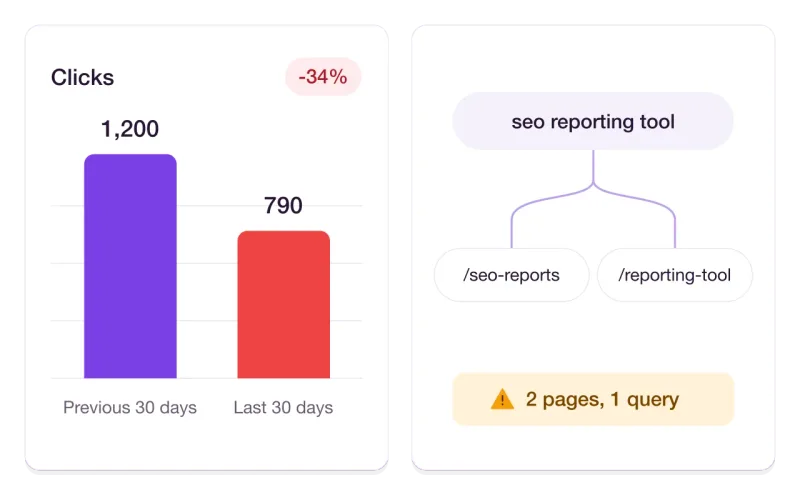
Traffic rarely vanishes overnight. It leaks away page by page. We compare every page with its previous 30 days and warn you while it is still easy to fix.
Content SEO optimization that starts with what is slipping
-
Decay alerts
A page that loses more than 20% of its clicks compared with the previous 30 days is flagged automatically.
-
Cannibalization checker
We flag queries where two or more of your URLs compete, so you can pick one page to win.
-
Clear next steps
Every alert comes with what to check and what to change, and can be marked as resolved.
How it works
Set up in three steps
- 1
Connect Search Console
Sign in with Google and choose your site. Bing can be added for the same checks.
- 2
We watch every page
After each sync we compare the last 30 days of clicks with the 30 days before.
- 3
Fix what is flagged
Open the alert, follow the steps, and mark it resolved when the page recovers.
What is content decay?
Content decay is the slow loss of search traffic that a page suffers over time. Information goes out of date, competitors publish something fresher, and search intent shifts. The page still ranks, just a little lower each month.
Because the drop is gradual, it is easy to miss in a normal traffic report where new pages hide the losses of old ones. Looking at each page on its own is the only reliable way to catch it.
What is keyword cannibalization?
Keyword cannibalization happens when two or more pages on the same site target the same query. Search engines have to choose between them, and often rotate the two or rank both lower than a single strong page would rank.
We detect it from your own data: when one query brings meaningful impressions to more than one of your URLs, both pages are listed together so you can decide which one should own the topic.
How to fix a decaying page
Open the page and compare it with what ranks above it today. Update facts, dates and examples, add the sections that newer results cover, and make sure the title still matches what people search for.
For cannibalization, choose the stronger page, merge the useful parts of the weaker one into it, and redirect or re-target the weaker URL. After the change, resubmit the page so search engines pick up the update quickly.
Explore more of Search Console Tool
FAQ
Content Decay Detector FAQ
When does a page count as decaying?
When its clicks in the last 30 days are more than 20% lower than in the 30 days before. The alert shows both numbers and the size of the drop.
How do you detect keyword cannibalization?
We group your Search Console data by query. If the same query sends impressions to more than one of your pages and passes a minimum of 300 impressions, it is flagged with both URLs.
Does the tool fix the content for me?
No. It tells you which pages need attention and what to check. The edits stay in your hands, because only you know what is right for your content.
Find the pages that are quietly losing traffic
Optimize Google and Bing in one place.